Thursday, January 31, 2019
CSTASNJ Chapter Meeting 1/9/19
If you missed our chapter meeting, you can still catch the archive, join us in March for our next meeting.


Tuesday, January 29, 2019
Have you updated your Google Skills recently?
 For the past six years, educators have come from the tri-state region to improve their Google skills set, will you be one of them this August? In the beginning, we were teaching the basics, not many schools had embraced the Googlesphere, and there was much catching up to do for those just adding Google Apps for the first time. Over the years, we have watched our teachers wholeheartedly take up the tools, connect their classrooms then turn to us for guidance on using G-suite efficiently and in line with the best pedagogical practices. In turn, they became some of our best presenters! With 16 recent titles and Dr. Michael Salvatore, Long Branch Superintendent of Schools, as our keynote speaker this year, teachers are sure to find sessions that will galvanize their classrooms to the next level of technology integration. We look forward to welcoming back our past participants and our new attendees. Register here!
Monday, January 28, 2019
Newsletter-January
Check out all the upcoming workshops, programs, and conferences we have! Our latest newsletter is live! Some of our featured programs include Google Classroom Kickstart and G Suite for Professionals in the K-12 Front Office with John Sowash. We also encourage you to check out The Coding Teacher Certificated Series, and our free 15-hour course on Sheltered Instruction. Go ahead, open the newsletter and register today!
 Newsletter-January
 Newsletter-January
Wednesday, December 12, 2018
MakerSpace Mondays-Quilling Hack
So many of our makers love to create 3D paper flowers.
With quilling tools running about $7-$10 a pop, it can get expensive if you want your whole class
to make flowers at the same time. Our quilling tool hack is in the video below...get making!

With quilling tools running about $7-$10 a pop, it can get expensive if you want your whole class
to make flowers at the same time. Our quilling tool hack is in the video below...get making!
Another problem encountered during 3D flower making is burnt
fingers from the glue gun. We have seen these on Amazon, if anyone knows of a
less expensive hack, let us know,
we will post it!
fingers from the glue gun. We have seen these on Amazon, if anyone knows of a
less expensive hack, let us know,
we will post it!

Come to a MakerSpace Monday and learn more hacks...
Thursday, December 6, 2018
CS Ed Week-Stories from New Jersey Schools
Computer Science Education Week (CSEdWeek) is an annual program dedicated to inspiring K-12 students to take interest in computer science. Jennifer Bernardini's 5th-grade class and STEAM Club students and the 7th-graders from William Davies Middle School were very enthusiastic participants this week!

5th Grade students analyzed a novel with a plot pyramid, and used Ozobots to trace the plot pyramid and tell the story! STEAM Club students participated in the Hour of Code with Code.org Dance Party. First, we coded, then we partied!
Not only does computer science provide every student foundational knowledge, but it also leads to the fastest-growing jobs in the U.S. economy. William Horner's 7th-grade class also brought the CS Ed Week excitement to their Lego town Ozobot Project in the Hamilton Township School District.

Wednesday, December 5, 2018
Assessing Microbit Programs and Grading in Google Classroom
Assessing Microbit Programs and Grading in Google Classroom is easy if you have your students use the add file option in the "turn in" portion of Google Classroom. Teachers can grade if they download the student's hex files and import them into the Makecode.microbit.org simulator.

Import student files!
Watch this helpful video if you have any questions.
Kim Mattina (@The_Tech_Lady) shows you how to get it done!
Another solution is to have your students screencast their simulations and submit their video files. Either way, these performance-based assessments are super-engaging!
Wednesday, August 1, 2018
Tuesday, July 3, 2018
South Jersey STEAM with Amazinators, LLC
Guest Post by Jennifer Bernardini, Stockton College MAED Class of 2008


Amazinators, LLC is on a mission: Bringing STEAM to the Jersey Shore. For a week or two each summer, we throw away grades, assessments, and homework for authentic learning. Offering our programs in the summer creates a valuable learning experience for children through play, collaboration, critical thinking, and research! The statistics and job requirements for the future all indicate that our children need to learn HOW to learn, practice problem solving, and need exposure to spark the interests that can one day pave the way to successful careers.
 |
Amazinators: Gina Wenzel, Jennifer Bernardini, and Cindy O’Kane All great programs for kids have an x-factor. Cindy O’Kane, Gina Wenzel, and I have a combined 51 years of teaching experience across all curriculum areas. Between the children and the instructors, we all share one thing in common- a passion for learning. As co-owners and teachers, we are constantly researching the newest ways to engage the kids, traveling to workshops and festivals to see it all in action, or presenting our successes with curriculum integration. Each year we have more and more children flocking to us for a summer of STEAM.  Children from across the nation join us for STEAM Summer Camp and after-school workshops. We have something for kids entering grades K-9 between Linwood and Margate this summer. Kids joined us from Atlantic, Cape May, Cumberland, and Gloucester Counties, Virginia, Colorado, California, and Germany! After much parent feedback, we are so excited to announce our newest session “Lil’ Steamers” for students entering kindergarten to second grade to join us for stories and hands-on experiments. There’s something special for everyone!  Over the past two years, our campers have been out this world with rocket launchers using household items, constructing solar eclipse viewing boxes, and participating in astronaut training exercises. Since our future scientists can bring their own device, we have turned phones into microscopes, 3D hologram viewers, and explored virtual and augmented realities.  Our eager engineers have built and designed their own fidget spinners, bridges, zip lines, and castles with catapults. Gamers and programmers coding the latest and greatest through Scratch, creating LEGO Robotics obstacle courses, or pushing the limits with Arduino.  Future award-winning musicians create their own band with circuits, instruments from reusable items, and even compose their own original songs. The STEAM TV Studio integrates filming, editing, green screens, and production through news shows, music videos, and stop animation.  No matter the age of our campers, bubbles, slime, marble mazes, and Breakout Boxes are a sure hit. A Family Showcase is always scheduled for the last day of camp for families to experience project displays, musical performances, movie premiers, and more!  SRI&ETTC and Professional Development As educators, we recognize how lucky we are to have SRI&ETTC and Stockton University so close to home for professional development. I am fortunate to have an administration and community that encourages, supports, and nurtures STEAM integration through daily classroom curriculum and after-school clubs. I was fortunate enough to attend Makerspace Monday, and in just one day I was exposed to the newest technologies, but reminded of the benefits of also blending in low-tech elements to create a balanced program. I was also able to use some of the ideas for my 5th-grade non-fiction reading and writing Gaming Unit. It was during Makerspace Monday that I fell in love with the tiny but mighty Ozobot. Thanks to a Linwood Education Foundation Grant, I will have a classroom set of Evo Ozobots for curricular extensions, coding classes, and more! Cindy and I also had the opportunity to attend the MIT APP Inventor 2 Workshop, and our minds were blown. Our students have experience with Scratch and this program opens the gates to endless possibilities with APP design. When we return to school, we know our students will flip for the chance to create their own APP that can be shared with the world! Some of the activities campers will explore in 2018: ● Rockets to build and launch! ● Make and fly a drone with an obstacle course! ● Harness the power of wind, solar, and hydraulic renewable energy with engineering. ● Reverse engineering with household items. ● Creating musical instruments or games with computer science. ● Design and explore your own virtual and augmented reality worlds. ● Unlock new Breakout Box challenges using teamwork, mathematics, logic, and more! ● Robotics and coding with LEGO Robotics, Sphero, BeeBots, and Ozobots. ● YouTube stars can explore filming, editing, and TV production in our STEAM Studio! Linwood's STEAM Camp 2018 July 9-12 and July 16-19 Grades 3-6 9 am to 12 pm Grades 7-9 1 pm to 4 pm $275 Mainland Regional High School Margate’s Summer STEAM Camp 2018 August 6-10th Grades 3-8: 9AM- 12PM $195 Grades K-2: 1PM -3PM $150 Eugene A. Tighe School Register online! www.amazinators.com |
Wednesday, June 13, 2018
Wind-Powered Lego Cars Speed the Learning in First and Second Grade
Guest Post by Dustin Rauenzahn of Upper Township Primary School in New Jersey @MrRauenzahn


Partners then went back to improve their design and see if they could get the car to go farther during the next test session.

Kindergarten, First & Second Grade students built wind-powered Lego cars. We discussed how the shape, size, and weight affect how the car would travel. Then, students worked in teams to build their very own Lego car complete with sail(s).

We used straws, index cards, and tape to make the sails.
Groups planned, built, tested & improved their designs to create the perfect wind-powered car! Students placed their car in front of a fan to see how many feet the car could travel using only wind power.

Partners then went back to improve their design and see if they could get the car to go farther during the next test session.

Wednesday, May 9, 2018
Global Educators #ExploreEarthEveryday Global Makeathon
Guest Post by Ian Matty
The Mountain Lakes Makers Club @ the Mountain Lakes Public Library is a community makerspace whose mission is to provide maker education opportunities to all students. We have found much success combining different types of maker technology (robotics, programming, 3d printing) with the arts, science, literature, and nature. We focus on how robotics and programming are collaborative with all subject areas and not an independent discipline.
 Building on the philosophy that all kids – even preschoolers – can benefit from maker education’s interdisciplinary approach, I worked with six educators from Hong Kong, Cyprus, Nigeria, Ohio, and Pittsburgh to develop the #ExploreEarthEveryday Global Makeathon. The idea is simple. Kids love nature. Nature is very important. How can we combine nature with robotics so kids can have a deeper sense of learning about their environment? The makeathon approach allows students and educators to be creative, show their love of their local nature, and learn about robotics and programming.
 The Mountain Lakes Makers Club partnered with Beekeeper, Alicia Deley to create robotic pollinators. Additionally, we collaborated with Janet Horst of the Mountain Lakes Garden Club and learned to build soil moisture sensors for native plants. Bringing in community members with specific knowledge of bees and plants really ties together the project-based learning process.
How do we build these projects? First, it is important to recognize that robotics technology today is perfect for hands-on learning because of standardization created by Arduino. Almost every type of robotics product you can purchase is compatible with each other, both via hardware and programming connections.
 The Hummingbird Robotics kit, built by Birdbrain Technologies (and co-developer of the makeathon) provides a perfect student friendly hardware and software platform for first-time roboticists. The Hummingbird CPU is clearly labeled and all of the components, whether it is a servo, motor, or sensor can easily be connected; No soldering or breadboarding necessary, just an understanding of how sensors work. Once you start a discussion with students about sensors in a car or the grocery store automatic door, they begin to understand robotics and programming. To program your robotic Hummingbird CPU, you can connect to various programming languages, from the basic Create Visual language, Scratch (the standard for elementary education) to Python.
For our robotic pollinators class, some students wanted to create bees. First, think about how the bee will move. Will it move back and forth? Or spin completely around? Will its eyes or antennae light up? Will its nose buzz?
Let's say a student wants their Honey Bee to move back and forth between two flowers when the sun is out.
First, craft two flowers and one Honey Bee.
Second, we need a servo motor. (Servos move between 0 and 180 degrees)
Third, we need a light sensor.
Fourth, connect both components.
Fifth, go into Scratch programming and write your STORY – that is correct, programming is just like writing a story.
If the Sun is out, I want my Honey Bee to move back and forth between the two flowers.
If the Sun is NOT out (cover up with a paper moon!), the Honey Bee goes back to the first flower.
 Do not worry! You do not need to use sensors at first. You can just control robotic actions by simply pressing a key on the keyboard. You will be very impressed with what students can learn and create.
- - - - - - - - - - - - - - - - - - - - - - - - - - - - - - - - -
To implement Makerspaces in your classroom, please visit our Makerspace Mondays at the SRI&ETTC. Upcoming dates on our summer schedule are:
May 21, 2018 – 9 a.m. to 3 p.m.
June 11, 2018 – 9 a.m. to 3 p.m.
July 23, 2018 – 9 a.m. to 3 p.m.
August 6, 2018 – 9 a.m. to 3 p.m.
August 20, 2018 – 9 a.m. to 3 p.m.
Monday, March 19, 2018
More Fonts for Google Docs with Extensis Fonts add-on.
We all love fonts, especially when building visually engaging hyperdocs. Now you can install a popular add-on in your google docs account that will give you access to even more fonts. In your google doc, go to Add-ons>Get Add-ons> and type Extensis Fonts in the search bar. Install the add-on to the google account where you wish to enable all of Extensis Fonts' latest choices. When you wish to use the fonts, start the add-on and simply highlight which words in your document you wish to impose the font upon and select the font of your choice from the right-hand side menu. You can close the Extensis Fonts menu when you are finished changing out your fonts.
Friday, March 9, 2018
Hyperdocs Trick with Bookmarking
Their answers are all over the place!
Not every teacher enjoys the process of weeding through a hyperdoc to grade their student submissions. So we have this simple bookmarking tip to keep the hyperdoc organized with all student submissions routed to one area for easy feedback and grading. This tip works with google docs specifically.How do I insert a bookmark?
To add a bookmark in a Doc, put your cursor where you would like to add the bookmark then go to Insert menu and select Bookmark. You will see a little bookmark icon appear. Then you can add a link to that bookmark by highlighting the text, and using the link tool or the shortcut (CTRL or CMND + K), then click “Bookmarks” to see all the bookmarks you’ve added. Simply select which bookmark to which you want to link.Thursday, March 8, 2018
Adventures in Flipgrid
 Have you introduced your students to Flipgrid yet? If not, you will enjoy this adventure with them. Flipgrid allows teachers to create discussion-style questions that students respond to through recorded videos. Each grid is effectively a message board where teachers can pose a question (Topic), and their students can post quick video responses that appear in a tiled "grid" display. Grids can be password-protected, public or private and are an excellent way to collaborate with one another and other classrooms.
 Students do NOT need to login to participate, nor do they need an email address; they just need the code to the discussion topic or the grid. They can respond using any device with a webcam, be it PC/MAC, Chromebook, tablet or phone.
Digital pen pals!
For those of you looking for digital pen pals, connect your classroom with students of your fellow Flipgrid educators around the world! Explore possible connections by grid, age, or subject domain. Look at what Janie Hachen's students recorded for Read Across America Month!Co- Pilots!
You can even add a Co-Pilot to your grid, meaning that other Flipgrid educators can edit the grid, create Topics, review videos, and provide feedback.
Do they hate being on camera?
For students who are not allowed on camera, or are a bit camera shy, they can use puppets or point the camera to their classwork or somewhere other than their faces. They can also record avatar videos using apps like Chatterpix kids or Voki and upload that video as their response. There are some samples at this post by Jen Giffen.
Tuesday, March 21, 2017
Fotobabble- Photos with voices!

Fotobabble enables students to attach their thoughts to a single image to relate a short story or inform a listener about a topic related to a visual. It's free! It's a photo, with a voice. You can access it on the web, or if you have iPads in your classroom, you can download the free app. Students young and old, enjoy creating projects or blogs with Fotobabble, as it's a fun and easy way to make a "talking" picture. Students can customize projects with different backgrounds, and slideshows are also included with this tool.

If you are interested in learning more about Fotobabble, Saker Alexander just posted this video for his students who are using the tool for the first time.
Wednesday, February 15, 2017
Cramberry Offers Students Great Study Habits

Cramberry is a user-friendly web tool that helps students with studying. With this web tool, you can create your own, or use a previously made set of flashcards to explore. What separates your creation from standard flash cards is the ability for this tool to store data for students on the flash cards they are getting correct and incorrect. It analyzes this data and will emphasize the questions that your class did not perform well on as they continue studying.

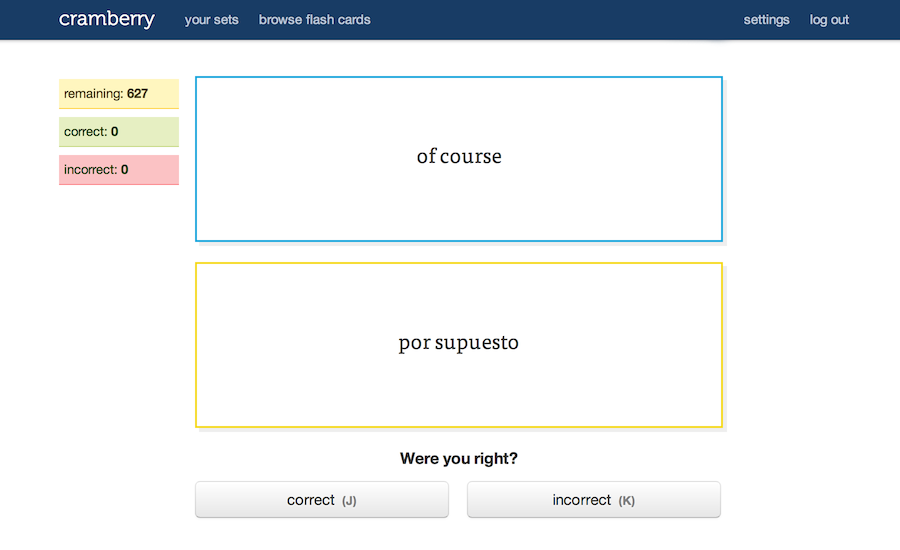
This helpful tool promotes good studying habits for students and is useful to teachers because they can create their own flashcards for their class and share them publically for everyone to use. Cramberry is free to all users, but they must have an account to create their own cards and track their progress.
Wednesday, January 4, 2017
Google Drawings Vector Portraits Lesson
Watch this amazing option for schools with G-Suite. Students can create their own vector graphics to use in presentations, for art projects, for profile pictures and more. The value in student-created images promotes creativity, avoids Copyright/Fair Use concerns, and promotes Visual Literacy
Tuesday, January 3, 2017
Tuesday, May 17, 2016
If This Then That Recipe for Photo Blogging with David Theriault
We loved this share because it actually worked well with an app that our students use all the time. We used the Instagram"New photo by anyone with specific hashtag", but were super worried about posts that might sneak into the blog that we do not want. Not everyone who uses hashtags has good intentions and the automation of this actually makes bad posts harder to catch, so we STRONGLY recommend that all posts are vetted by the teacher. Unfortunately IFTTT does not offer a draft feature in connection to Blogger. We NEED that because so many schools have GAFE. Wordpress offered some choices such as "Save as draft" or "publish as private" that blogger did not have. We feel Wordpress in this instance is the better choice for an educational setting. Thank you Dave, you definitely gave us good ideas for using instagram, wordpress and IFTTT.


Subscribe to:
Posts (Atom)